
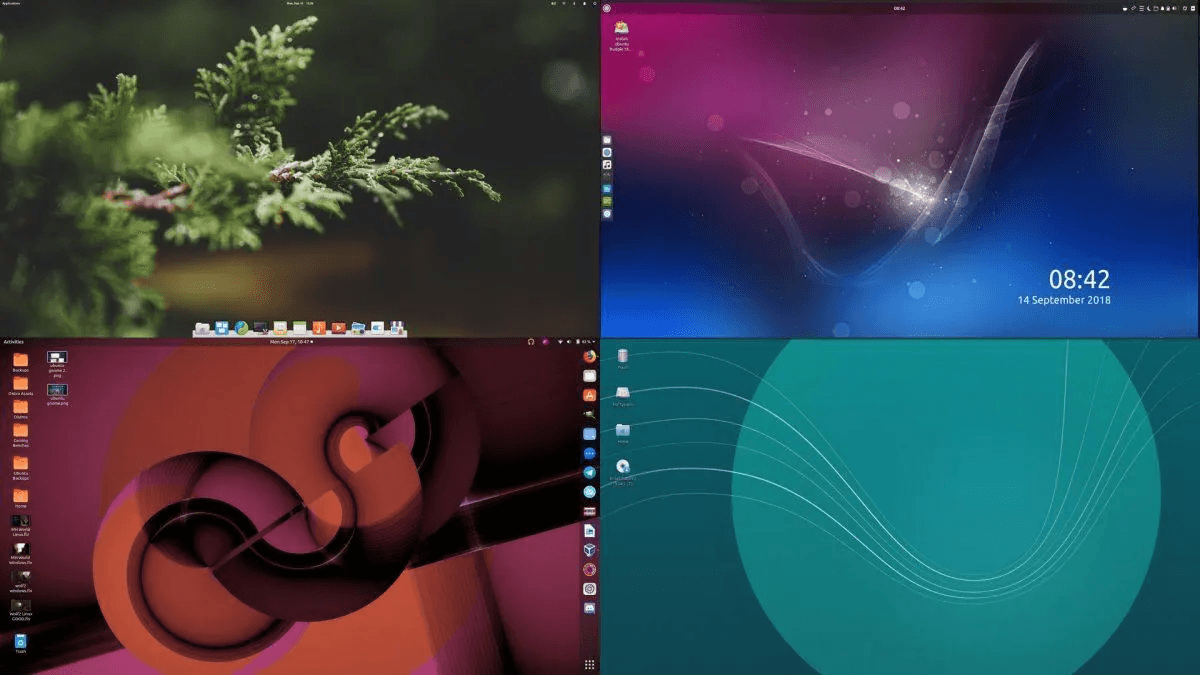
Understanding Desktop Environments in Linux
👤Ngoc Anh
⏱️6 min read
Understanding Desktop Environments in Linux
A desktop environment in Linux is essentially a complete suite of software that provides the graphical interface and user experience for interacting with the system. It includes:
- Window manager: Controls the placement and appearance of windows.
- Panels/Taskbars: Provide access to applications, system settings, and notifications.
- File manager: A tool for browsing and managing files.
- Application launcher: Allows you to search and launch applications.
- System settings: Where you can adjust various preferences (e.g., display, theme, and keyboard).
In addition to the core elements, a DE might include applications like text editors, web browsers, and multimedia tools that are optimized for the environment.
Popular Desktop Environments in Linux
Each desktop environment has its own design philosophy and aims to serve different kinds of users. Here’s a rundown of some of the most popular and widely used Linux desktop environments:
1. GNOME: Modern and Streamlined
GNOME is one of the most popular and widely used desktop environments in Linux, especially for distributions like Ubuntu, Fedora, and Debian. Its design is minimalistic, focusing on simplicity, ease of use, and efficiency.
Key Features:
- Overview Mode: GNOME's "Activities" overview gives you a fullscreen view of open windows, applications, and search results. It's a very efficient workspace.
- Single Panel: GNOME uses a top panel that includes system status icons, while the launcher on the left side helps with app access.
- Simple UI: The desktop is clean and uncluttered, with fewer distractions.
- Extensibility: Through GNOME extensions, you can add additional features, but it's intentionally less customizable out of the box than some other DEs.
Best For:
- Users who want a clean, modern, and user-friendly environment.
- Those who value simplicity and a streamlined workflow.
- Users on Ubuntu and Fedora (as they come with GNOME by default).
2. KDE Plasma: Highly Customizable and Feature-Rich
KDE Plasma is known for its extreme customizability and wealth of features. It’s a desktop environment that can fit many different styles, from traditional desktop setups to more futuristic, minimalist configurations.
Key Features:
- Highly customizable: You can change almost every aspect of the UI, from themes to window behaviors and widgets.
- Advanced system settings: KDE Plasma offers a robust settings menu that lets you fine-tune your system.
- Looks modern but traditional: It can emulate the classic desktop look of Windows (with a taskbar, start menu, etc.) or have a more macOS-inspired design.
- KDE Applications: A suite of high-quality applications designed to integrate seamlessly with Plasma (e.g., Dolphin for file management, Krita for painting, and Okular for PDFs).
Best For:
- Power users who love customization and tweaking their system.
- Users who want a feature-packed, eye-catching desktop environment.
- Those who are switching from Windows and like the taskbar-style interface.
Popular Distros Using KDE Plasma:
- Kubuntu (Ubuntu with KDE).
- KDE Neon (based on Ubuntu but with the latest KDE software).
- Manjaro KDE (for those who want Arch with a more polished experience).
3. Xfce: Lightweight and Efficient
If you're looking for a lightweight desktop environment that doesn’t compromise on usability, Xfce is an excellent choice. It’s especially popular on older hardware or for those who want to maximize system performance.
Key Features:
- Low resource usage: Xfce is known for its efficiency, making it ideal for older computers or low-resource systems.
- Traditional desktop layout: It uses a classic desktop layout with a panel at the top or bottom and application menus similar to what you'd find on Windows.
- Highly customizable: While it's lighter than GNOME or KDE, it still offers a good degree of customization with a range of panel and theme options.
- Solid stability: Xfce is designed for stability and reliability, with fewer feature updates but more focus on polish.
Best For:
- Older computers or low-resource systems.
- Users who want a traditional desktop experience but with lighter resource usage.
- Beginners who prefer a simple yet efficient setup.
Popular Distros Using Xfce:
- Xubuntu (Ubuntu with Xfce).
- Manjaro Xfce.
- Linux Mint Xfce.
4. Cinnamon: The Familiar, Windows-like Experience
Cinnamon is the desktop environment developed for Linux Mint, but it’s also available on other distros. It aims to provide a familiar and user-friendly experience, especially for those transitioning from Windows.
Key Features:
- Windows-like interface: Cinnamon offers a classic desktop layout with a taskbar, start menu, and system tray—just like in Windows.
- User-friendly: Cinnamon is easy to navigate, making it ideal for new Linux users.
- Good balance of performance and visual appeal: While it’s not as lightweight as Xfce, it still performs well and has a clean, polished look.
- Good out-of-the-box experience: It comes with essential applications, and you can easily add more through the Software Manager.
Best For:
- Users transitioning from Windows who want a familiar interface.
- Those who value a good mix of performance and polish.
- Beginners who want something simple to use right away.
Popular Distros Using Cinnamon:
- Linux Mint (default DE).
- Ubuntu Cinnamon Remix.
- Cinnamon Spin of Fedora.
5. MATE: Classic and Traditional
MATE is a continuation of the older GNOME 2 desktop environment, making it an excellent option for users who prefer the classic desktop layout and feel. It’s less flashy than some other environments but offers a solid and reliable experience.
Key Features:
- Classic desktop: It uses the familiar two-panel layout with a taskbar, menus, and a system tray, making it ideal for users who want simplicity and efficiency.
- Lightweight: MATE is relatively light on system resources, making it a good choice for older machines.
- Good balance: MATE provides a good mix of functionality without overwhelming the user with unnecessary features.
Best For:
- Users who prefer a traditional desktop environment.
- Those looking for low resource usage but still want a fully functional and familiar interface.
- Older computers or users with less powerful hardware.
Popular Distros Using MATE:
- Ubuntu MATE.
- Linux Mint MATE.
- Fedora MATE.
Conclusion: Which Desktop Environment Should You Choose?
Your choice of desktop environment largely depends on your personal preferences and your computer’s resources. Here are a few considerations:
- If you want a modern, minimalist experience, go for GNOME.
- If you like to customize everything, KDE Plasma is the way to go.
- For a lightweight, efficient setup, Xfce or MATE is perfect.
- If you're transitioning from Windows, Cinnamon offers a familiar layout.
Ultimately, one of the beauties of Linux is its flexibility—you can even switch between desktop environments as your needs evolve, or even run multiple environments in parallel!
What’s your favorite desktop environment, and why? Let me know in the comments!